StatYou
Scan & Order Tutorial HubThe StatYou Scan & Order Tutorial Hub
Follow this page and you’ll get a clean scan first time. Less stress for you, faster turnaround for us. If you’re stuck at any point, message us and we’ll help.
Tip: Most problems come from lighting and moving too fast. Slow + steady wins.
Quick-start video (coming soon)
A video is on the way! Please email [email protected] if you would like more info faster.
Start here - get a good scan first time
If you only read one section, read this.
Do this checklist and you’ll avoid 90% of scan issues. Keep it simple.
- Bright, even lighting (near a window is perfect).
- Stand still, feet shoulder-width apart.
- Arms slightly away from your body (helps avoid “merged” arms).
- Walk slowly around the person with steady overlap.
- Plain background if possible.
- Dark rooms, harsh shadows, flashing lights.
- Moving fast around the person.
- Hair covering the face or shiny/wet hair.
- Baggy clothing, thin straps, long dangling accessories.
- Busy background with lots of objects.
Recommended free scanning apps
Use one of these - we’ll guide you if needed.
Polycam (recommended)
Polycam is the simplest route for most customers. The free version is usually enough to get a print-ready scan.
Alternative app (optional)
If you’ve used another app before and it exports a clean model, that’s fine - we can still work with it.
How to scan - bust vs full body
Choose the path that matches your product.
Bust scan (head + shoulders)
Best for first-time orders. Strong facial detail and quicker cleanup/print time.
- 1 scan is enough
- Neutral face, look straight ahead
- Slow circle around the head/shoulders
- Keep hair off the face if possible
Full body scan (recommended: 2 scans)
Full pose + outfit. Takes longer but gives the most complete result.
- Scan 1: Head close-up (better face detail)
- Scan 2: Full body
- Arms slightly away from sides
- Slow, steady circle with overlap
Figurine poses — what works best
Simpler poses = better scans, stronger prints, and faster turnaround.
These poses scan cleanly, print reliably, and avoid weak or missing hands.
- Arms relaxed by your sides
- Hands gently resting in front of the body
- Hands in pockets (preferred for full body)
- Arms crossed (simple, tight to body)
- Neutral standing pose
- Minimal movement or expression
These poses often fail in scans, create broken geometry, or are impossible to print cleanly.
- Hands stretched forward or reaching out
- Finger-pointing or finger-gun poses
- Wide arm spreads or T-poses
- Extreme action or superhero poses
- Leaning heavily on one leg or twisting torso
- Hands holding thin objects (phones, tools, props)
- Complex or exaggerated gestures
Good scan vs bad scan
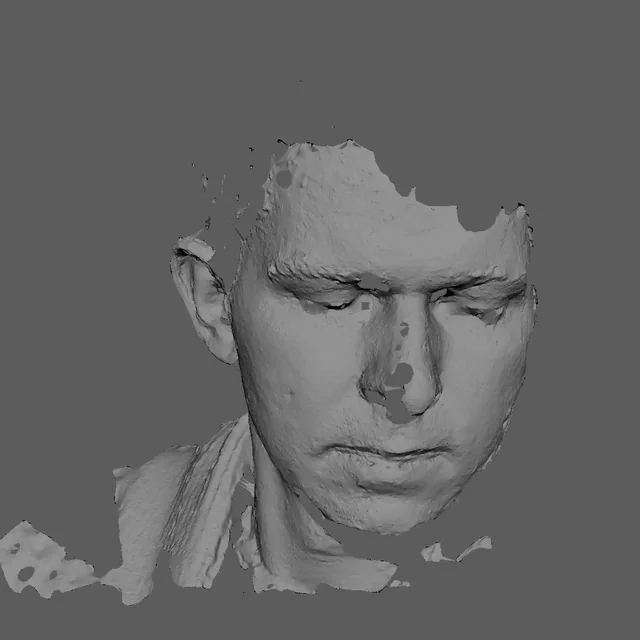
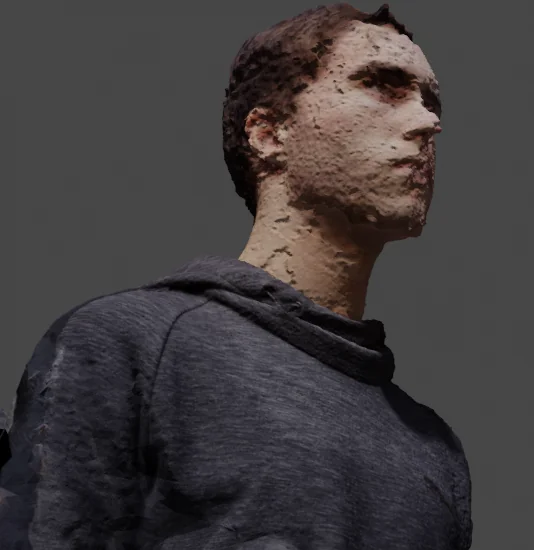
This section saves everyone time. Compare your scan to the examples.
 Example image
- Missing hands / holes in mesh
- Blurry face details
- Arms merged into torso
- Hair merged into face
 Example image
- Clear silhouette
- Face detail visible
- No major missing areas
- Even lighting
Hair, glasses & clothing tips
These cause the most scan issues. Fix them before scanning.
Hair
Tie long hair back if possible. Avoid hair covering the face. Light talc/powder on dark hair can help reduce “mushy” scans.
Glasses
Glasses often scan badly and distort. Avoid using glasses, if you can, remove them for the scan. If not, keep your head still and use bright lighting.
Clothing
Avoid baggy clothing and thin straps. Mid-tone colours scan best. Very dark/black outfits can lose detail in poor lighting.
After you upload - what happens next
Clear process, clear updates, no guessing.
You upload your scan
Send your scan link/file through your product page instructions or email.
We review it
If something is missing, we tell you straight away and help you re-scan.
Cleanup & print prep
We fix mesh issues, strengthen weak parts, and prep supports for printing.
Print + basic cleanup
High-detail PLA print. Supports removed and tidied as best as possible.
Tracking portal updates
You’ll receive updates/photos in your private portal. Keep everything in one place.
Shipping
UK shipping is added at checkout (£3.99) and you’ll receive your delivery tracking.
FAQ
Quick answers to remove the fear.
What if my scan isn’t good enough?
If the scan has missing areas (hands, face detail, hair), we’ll tell you and guide you to re-scan. No waffle.
Is it painted?
No - it’s unpainted PLA by default. That keeps pricing fair and turnaround faster. Painting options can come later.
How long does it take?
Depends on print queue and size. After you send your scan, we’ll confirm an estimated turnaround before printing.
How does the Tracking Portal work?
After you order, you’ll receive an order code. Enter it in the Tracking Portal to view updates, photos, and message us directly about your order.
How much is shipping?
UK shipping is added at checkout and is currently £3.99.
What file types can I send?
Scan links are easiest. If you’re sending files, OBJ / STL / GLB are best. If you’re unsure, send what you have and we’ll confirm.
Will the print be perfect?
This is a raw 3D print - you will see layer lines and small imperfections from supports/sanding. We tidy it as best as possible, but it won’t look like a resin factory figure.
Can you fix everything in a bad scan?
No - some missing details (especially hands/face) require a re-scan. We’ll always tell you honestly what’s possible before printing.
Ready to start?
Pick a product, follow the scanning checklist, and we’ll confirm everything before printing.